Connect
SSH tunnels and TLS
Reach a database through an SSH host, and choose how strictly the server's TLS certificate is checked, from the connection form.
Where to find it
| Action | How |
|---|---|
| Open the connection form | New connection, ⌘N (Ctrl+N), or Edit on a saved connection |
| Reach the database through SSH | The SSH tunnel switch under Security and safety |
| Check the SSH leg alone | Test SSH inside SSH tunnel |
| Choose the TLS checks | TLS > SSL mode under Security and safety |
| Record SSH diagnostics | Help > Enable SSH Debug Log |
| Open the log folder | Help > Open Logs Folder |
Both sections appear for PostgreSQL, CockroachDB, MySQL, MariaDB, TiDB, Microsoft SQL Server and ClickHouse. Oracle Database shows SSH tunnel only and keeps its TLS settings with its server fields.
SSH tunnel
Switch on SSH tunnel and fill in Host, Port and User for the SSH server, and the database Host above is then resolved from that server. Host suggests the aliases in ~/.ssh/config, which also supplies a blank user or port, identity files and one ProxyJump hop.
Under Authentication, Automatic tries the SSH agent and then the keys from ~/.ssh/config and ~/.ssh, Key file uses the key you choose and asks for Key passphrase when it is encrypted, and Password uses SSH password. Use the system ssh command instead runs ssh -N -L, which authenticates on its own, so none of these choices applies and a password cannot be used.
Host keys
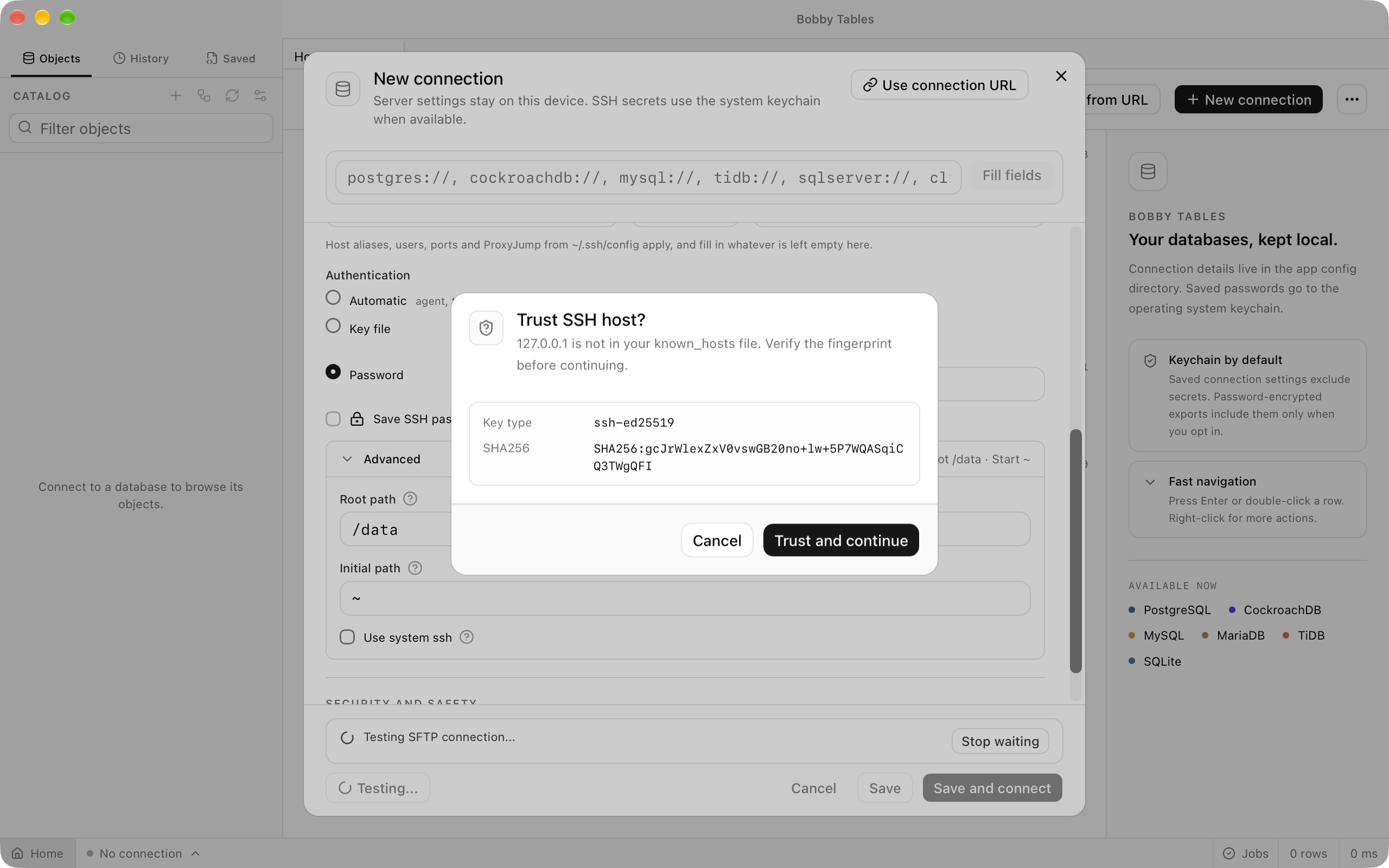
Bobby Tables checks each SSH server's key against ~/.ssh/known_hosts. The first time it meets a server, Trust SSH host? shows the key type and SHA256 fingerprint, and Trust and continue adds the key to that file. When a saved key no longer matches, SSH host key changed appears instead, and only Trust new key replaces the old entry. Cancel leaves the file untouched and stops the connection with SSH host key was rejected for and the host name, and connecting again brings the dialog back.
Testing and using a tunnel
Test SSH checks the tunnel on its own and reports two lines: the login, with the account, method and round trip, and whether the database host answers from the SSH server. When the host does not answer, the second line gives the server's reason and names AllowTcpForwarding when the SSH server refuses to forward. Test connection then checks SSH and the database together. A workspace opened through a tunnel shows its connection and database in the status bar like any other, and when the tunnel drops the status bar reads Disconnected, reconnecting... while Bobby Tables opens a new tunnel.
The SSH debug log
Help > Enable SSH Debug Log writes the steps of every SSH connection to ssh.log in the app's log folder, which Help > Open Logs Folder opens. The log records the host and any ProxyJump hop, each key tried and whether the server accepted it, and the forward requested, without passwords or packet contents. Turn it on before repeating a failing connection; it starts switched off each time Bobby Tables opens.
TLS modes
SSL mode decides how the connection uses TLS: Disable never uses it, Allow tries a plain connection before TLS, Prefer tries TLS first, and Require insists on TLS without checking the certificate. Verify Ca also checks that the certificate was signed by CA certificate, or by an authority the system trusts when that field is empty, and Verify Full checks the host name as well. CA certificate applies to those two modes, while Client certificate and Client key apply to every mode except Disable and are set together. New PostgreSQL, CockroachDB, MySQL, MariaDB and TiDB connections start on Prefer.
Good to know
- Microsoft SQL Server connections start on
Verify Full, do not use client certificates, and encrypt without checking the certificate underRequire. - ClickHouse connections start on
Disableand use HTTPS in every other mode, where onlyRequireandVerify Carelax the certificate check. - Oracle Database sets TLS with
ProtocolandWallet directory. - Redis and Valkey use a TLS checkbox or a
rediss://URL, MongoDB usesVerify TLS certificates, and Apache Cassandra and ScyllaDB useTLS verification. None of them offers an SSH tunnel, and neither do Snowflake, BigQuery, Firestore or Cloudflare connections. - SQLite has neither setting. An SFTP connection is an SSH connection in its own right, with the same host, key and host key handling; see Files.
Matchblocks in~/.ssh/configand more than oneProxyJumphop are not supported.- With
Use the system ssh command instead, OpenSSH applies its own known hosts policy.